


Microsoft 365 Copilot & Cowork

Microsoft 365 Copilot & Cowork

Microsoft 365 Copilot puts AI directly inside Teams, Outlook, Word, and Excel, grounded in your organisation’s data through Microsoft Graph. Meeting summaries, email drafts, and report generation happen in seconds inside the tools your people already use every morning.

Copilot Cowork goes further. Describe an outcome and an autonomous multi-step execution plan runs across your M365 apps, files, and data without a human coordinating each step. Knowledge work that used to take hours completes in the background, fully auditable, with identity and compliance enforced by default.

The result is a workforce that spends less time on coordination and more time on decisions that actually require human judgment. Both capabilities work inside your existing tenant from day one.
Agentic Business Automation

Agentic Business Automation

Approvals, onboarding flows, procurement cycles, and customer-facing workflows follow predictable patterns that repeat hundreds of times a month. Agents own them end-to-end, 24/7, without adding headcount or building custom integrations for every new use case.

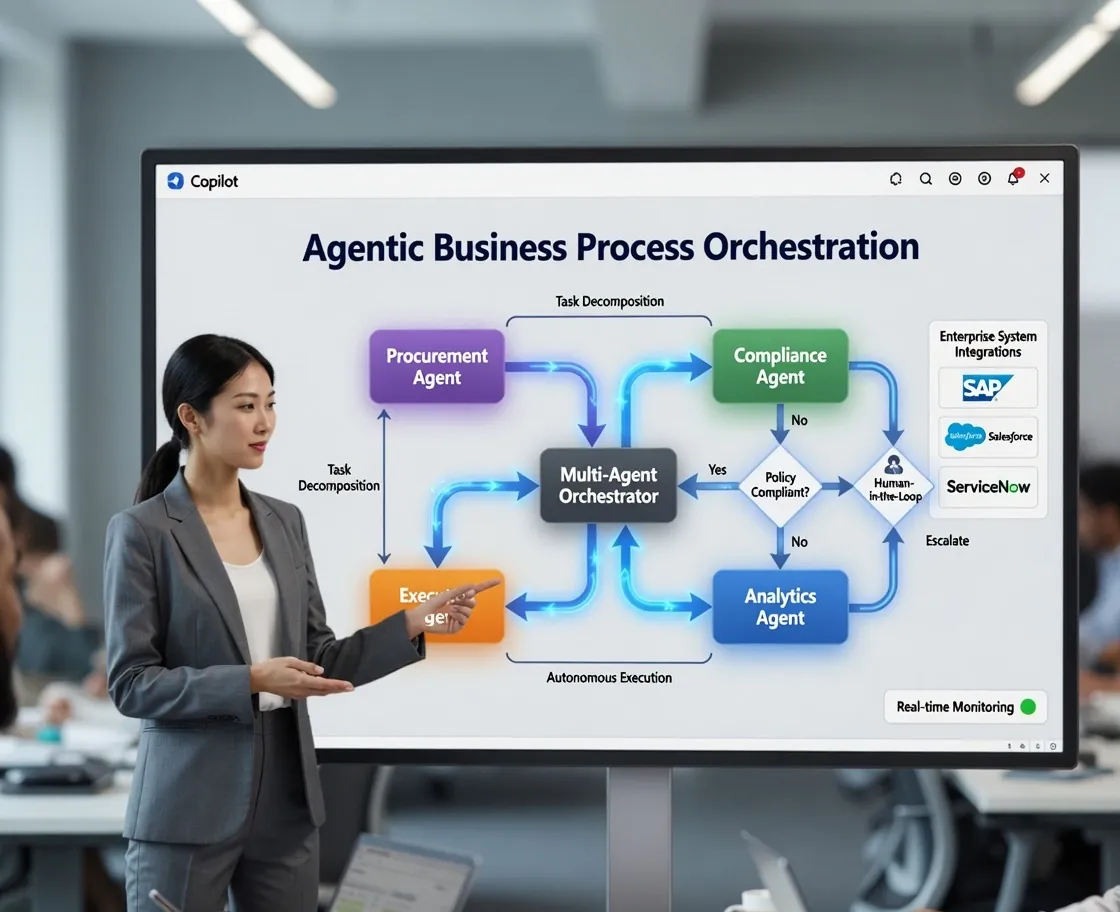
Multi-agent orchestration means specialised agents handle data retrieval, reasoning, and execution in parallel, coordinating across your business systems without human intervention at each step. Escalation happens only when a decision genuinely requires a person. Every step is logged, traceable, and auditable from day one.

The business result is faster cycle times, lower operational cost, and processes that scale without hiring. Every automation becomes a permanent capability gain, not a one-time project that needs rebuilding when requirements change.

From Cowork to Foundry Agents

From Cowork to Foundry Agents

Copilot Cowork handles outcome-driven automation inside M365. When a process demands deeper orchestration, Microsoft Foundry agent teams connect directly into the Cowork surface. Employees trigger enterprise-grade multi-agent workflows through the same conversational interface they already use. No additional tooling. No context switching.

Organisations can start with Cowork for fast wins and graduate individual processes to full Foundry orchestration as complexity grows. Both surfaces share the same identity plane, data access policies, and audit trail.

Compliance is not a separate project. Every agent action runs inside the Microsoft 365 tenant boundary, with Microsoft Purview and Defender AI enforcing data protection by default.

90%
Fortune 500 already on M365
160%
paid seat growth YoY
40%
routine tasks automatable
10×
user engagement post-rollout
The M365 Copilot Journey: Envision, Deploy, Scale
Envision 1 steps
01
Define the Return Before You Invest
Organisations that buy M365 Copilot licences without a value discovery process consistently underdeliver on their AI investment. Pilots never scale, adoption stalls at the enthusiast tier, and the board asks why productivity numbers aren't moving. A structured envisioning workshop identifies your highest-value use cases, maps them to measurable outcomes, and sequences deployments for maximum early ROI. You leave with a prioritised AI roadmap every stakeholder can act on.
Deploy & Use 4 steps
02
Copilot Is Already Inside the Tools Your Teams Use
M365 Copilot is already inside the tools your workforce uses every day: Teams, Outlook, Word, Excel, and PowerPoint, grounded in your organisation's data through Microsoft Graph and Work IQ. No integration project, no change of platform, no six-month rollout. Activation means productivity gains from the first login, not after a deployment marathon.
03
Copilot Cowork: AI That Gets Work Done Without Being Told Every Step
Copilot Cowork breaks a described outcome into a coordinated multi-step execution plan across your M365 apps, files, and data. It runs autonomously inside your tenant with identity, compliance, and a full audit trail by default. Anthropic Claude provides advanced reasoning under Microsoft's enterprise data protection. Hours of knowledge work complete in the background, fully auditable, without a developer building a workflow.
04
Built-In Agents for Every Department
M365 includes pre-built agents for the most common departmental workflows: approvals, data lookups, document generation, and customer queries. Teams configure them through a visual canvas without writing code. This is the right starting point for straightforward automation inside a single department. When the process spans systems, involves complex logic, or needs to run without supervision, the engagement moves to agentic orchestration.
05
Agentic Business Automation: Processes That Run Themselves
Approvals, onboarding, procurement, and customer-facing workflows follow predictable patterns that agents can own end-to-end. Multi-agent orchestration means specialised agents handle data retrieval, reasoning, and execution in parallel, coordinating across your business systems without human intervention at each step. Human escalation happens only when a decision genuinely requires it. Every step is logged, traceable, and auditable. Faster cycle times and lower operational cost follow directly.
Scale & Govern 2 steps
06
Foundry Agents Inside Cowork: Enterprise Orchestration Without Friction
Microsoft Foundry and the Microsoft Agent Framework lift the ceiling on what automation can do: multi-agent orchestration, custom model deployment, MCP tool integration, and long-running workflow management at enterprise scale. These Foundry agent teams connect directly into the Copilot Cowork surface. Employees trigger enterprise-grade orchestration through the same conversational interface they already use. No additional tooling. No context switching. No separate security perimeter to manage.
07
Monitor Every Agent, Protect Every Interaction
Enterprise AI without a governance plane is a liability waiting to be audited. Every agent action runs inside the Microsoft 365 tenant boundary, subject to your existing identity, permissions, and data residency policies. Microsoft Purview handles data classification, Defender AI covers threat detection, and a unified control plane gives CIOs and CISOs agent inventory, policy enforcement, and security posture across every deployed experience.

Frequently Asked Questions

What is Microsoft 365 Copilot?
Microsoft 365 Copilot is an AI assistant embedded across Teams, Outlook, Word, Excel, and other M365 apps. It automates meeting summaries, drafts emails, generates reports, and builds department-level agents through Copilot Studio, turning your existing Microsoft 365 investment into an AI-powered workforce.
What are typical automation results with Microsoft 365 Copilot?
Organizations implementing M365 Copilot typically see 40% of routine tasks automated in the first three months, with the highest gains in meeting documentation, email management, and report generation. Results improve significantly when Copilot Studio agents are configured for department-specific workflows.
How do Copilot Cowork and Microsoft 365 Copilot relate?
Microsoft 365 Copilot is the AI assistant embedded across Teams, Outlook, Word, and Excel, providing in-app productivity features grounded in your Microsoft Graph data. Copilot Cowork is the autonomous layer: describe an outcome and it executes a multi-step plan across your M365 apps, files, and data without human coordination at each step. Cowork runs inside the same tenant boundary with the same identity and compliance policies, with Anthropic Claude providing advanced reasoning under Microsoft's enterprise data protection.
What Microsoft 365 license do I need?
Microsoft 365 Copilot is available as an add-on license with Microsoft 365 Business Basic and above. The add-on enables the full Copilot experience across Teams, Outlook, Word, and Excel, as well as Copilot Studio for building custom agents. Copilot Cowork is included with the M365 Copilot license. We recommend a license review before purchase to match the right SKU to your team size and use cases.
Can I use Claude in my Microsoft 365 tenant?
Yes. Claude integrates into Microsoft 365 through Copilot Studio connectors and MCP plugins, making it available inside Teams, Outlook, and other M365 surfaces without leaving your tenant. Claude Cowork extends this further by running autonomous multi-step workflows across your M365 data and apps, with Anthropic Claude providing reasoning under Microsoft's enterprise data protection.